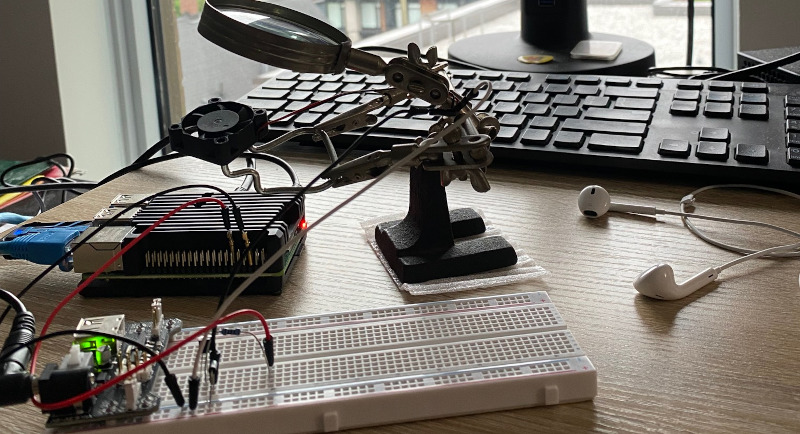
Yesterday I dismantled my Raspberry Pi and liberated the fan. My mission was two-fold: 1) silence the fan once in a while, and 2) experience building a real-world control loop.
In Coding as Catharsis
I introduced a little supervisory program I called Cricket. Its job is to keep watch for issues, to take certain actions when it can, and to signal for help when it must. Its region of interest is my home lab, a cloud-like collection of virtual machines I intend to subject to the relentless waves of chaos I call Real Life (TM). Think battered coastline in a hurricane, only smaller and with less water, and wind, and well … everything but the chaos.
To prepare for supervisory work, I first wanted to mock up a moderately complex instrumented environment. For instrumentation I plan to use Prometheus
metrics, but since I don’t have my lab fully exported for Cricket to discover, I’m turning to Node-RED
as a standin. Node-RED is an incredible flow-based programming tool, one I’ve used over the years for prototyping and lab work. The first exported metric from Node-RED won’t be a mockup, but a very real thing.
The Thermostat
Fig 1 shows the Node-RED thermostat logic. It consists of a timer, a probe (a shell script), a format converter, a threshold detector (high, low, or no change), and the output: a high, low, or unchanged voltage on GPIO pin 17.
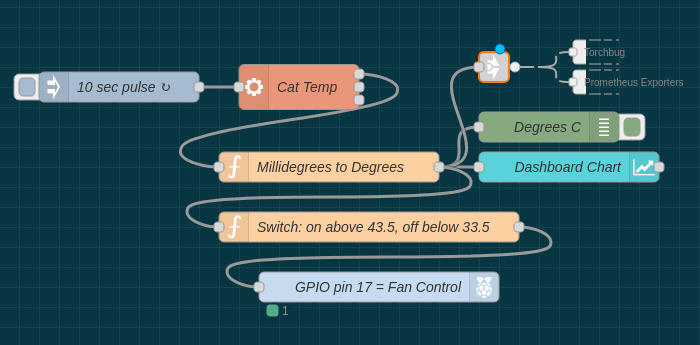
Fig. 1 – Thermostat program
The Raspberry Pi 4 has pinouts as shown below, and the circuit is as you see in Fig 2, with GPIO pin 17 driving the transistor, which in turn drives the fan motor.
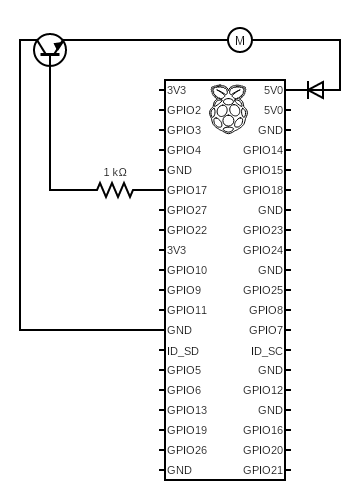
Fig. 2 – Thermostat circuit
In addition to the electronic output, I’ve got Node-RED emitting a few other outputs:
Torchbug, which is a colour coded LED (virtual for the moment),- a Node-RED debug node,
- a time-series graph of CPU temperature readings, and
- a Prometheus gauge, which is how I’ll test
Cricket
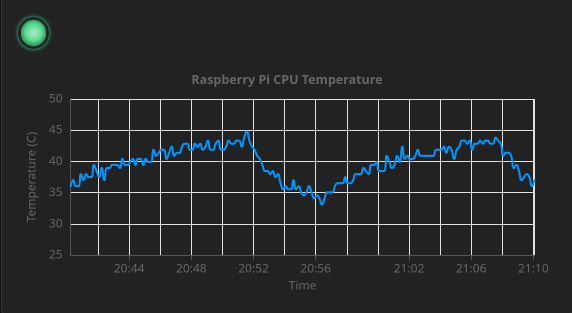
Fig. 3 – Dashboard temperator view
All this for a little fan control?
Reporting off-scale temperature readings will be Cricket’s first job, but rest assured it won’t be the last. For now, we’re assuming there are latent “unknown unknowns” in the thermostat logic or the environment. Who knows what perils await that fan circuit … hey, is that breadboad externally powered?
The idea is that Cricket should get chirping before things get scary.
Stay tuned for Cricket’s first day!